School and college management, made in Nepal
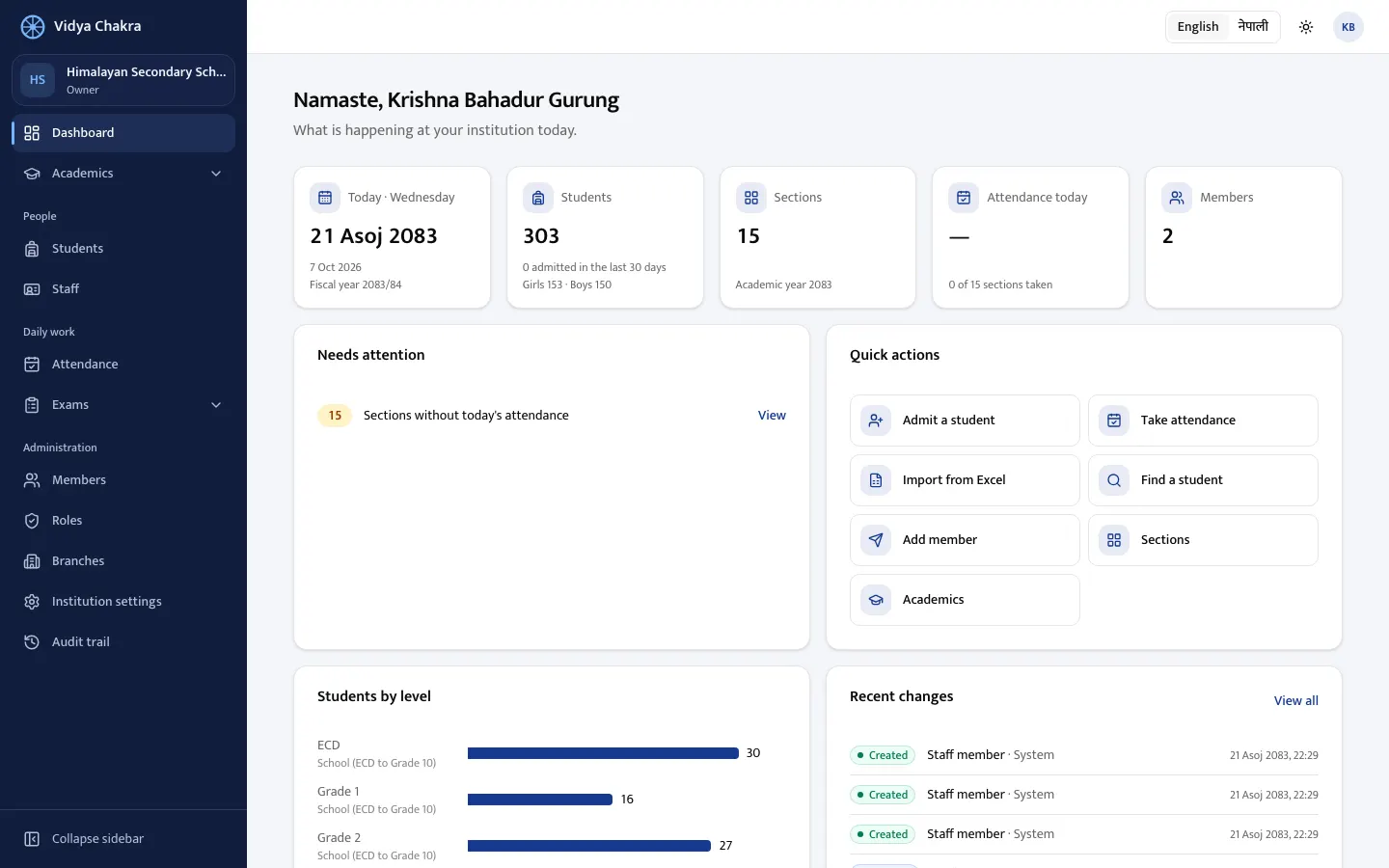
Run your whole school in one place
Admissions, attendance, exams, grade sheets, fees, seating plans, ID cards and staff records, built around how Nepali institutions really work: Bikram Sambat dates, NEB grading, IEMIS records and even Preeti Excel files. And an AI assistant that answers your questions from your own records, in Nepali or English.
Free, with no obligation. We'll call you to arrange it.
Made for how Nepal studies
Not a foreign product translated into Nepali. Every part starts from Nepali schools and colleges.
Bikram Sambat everywhere
Dates, calendars and printouts in BS, with AD beside them if you want.
Nepali and English, side by side
Every screen, grade sheet and card in either language, with Devanagari that prints correctly.
NEB grading built in
Letter grades and GPA as NEB uses them, percentage and division as TU does, or a scheme of your own.
Ready for IEMIS
Student records carry the gender, caste and ethnicity, and disability details Flash reports ask for.
Your Excel lists, even in Preeti
Bring in students from Excel. Preeti is converted, and every row is checked before anything is saved.
Community schools too
Darbandi, rahat and school-funded posts, and a read-only view for the SMC.
From the first day of term to the annual result
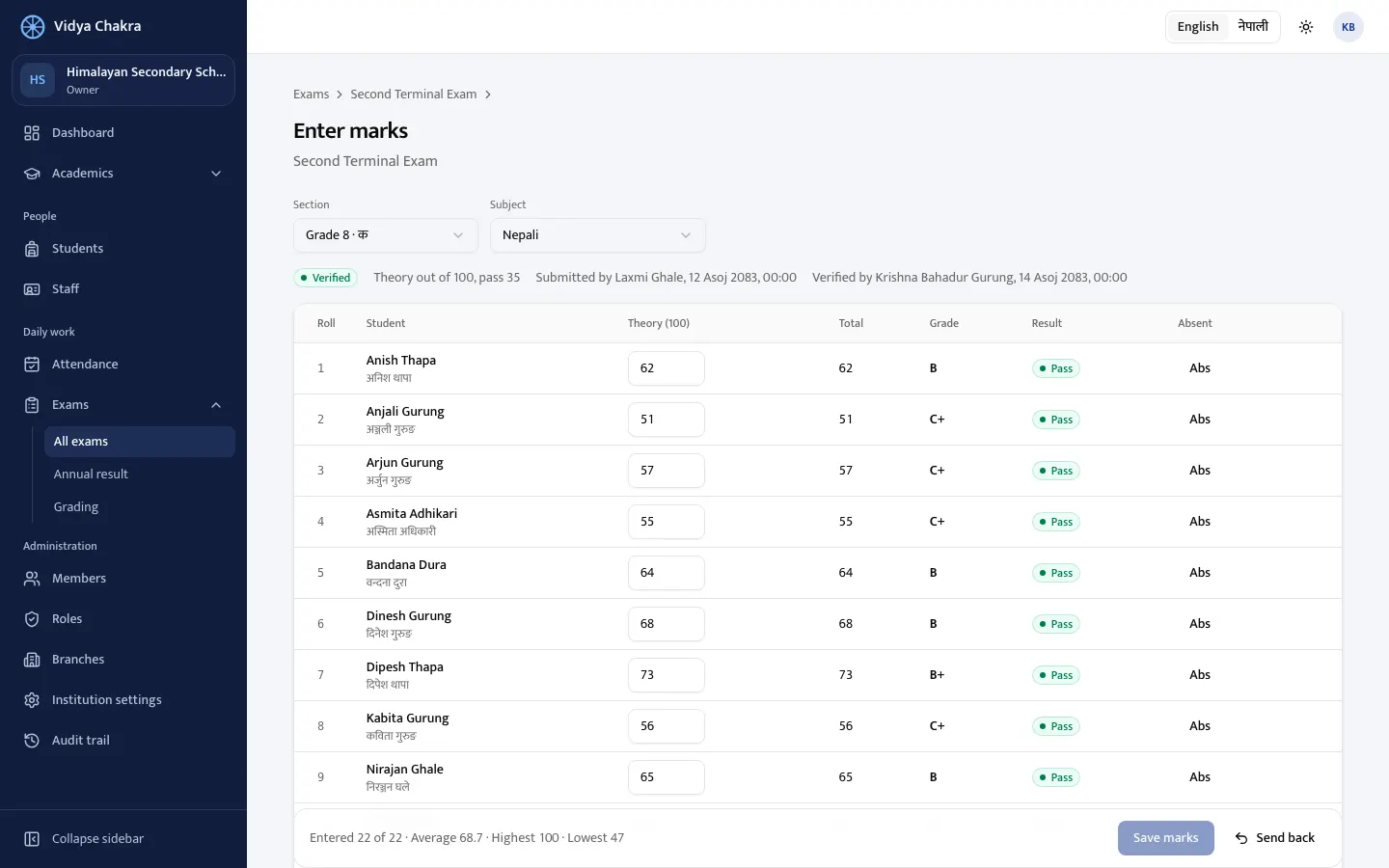
Marks in, grade sheets out
Teachers enter marks in a grid like a spreadsheet, or paste them from Excel, and see grades as they type. Results, the class ledger and subject analysis follow.
- Theory and practical, absent and pass marks
- Checked and verified before results are published
- A weighted annual result across the year's exams
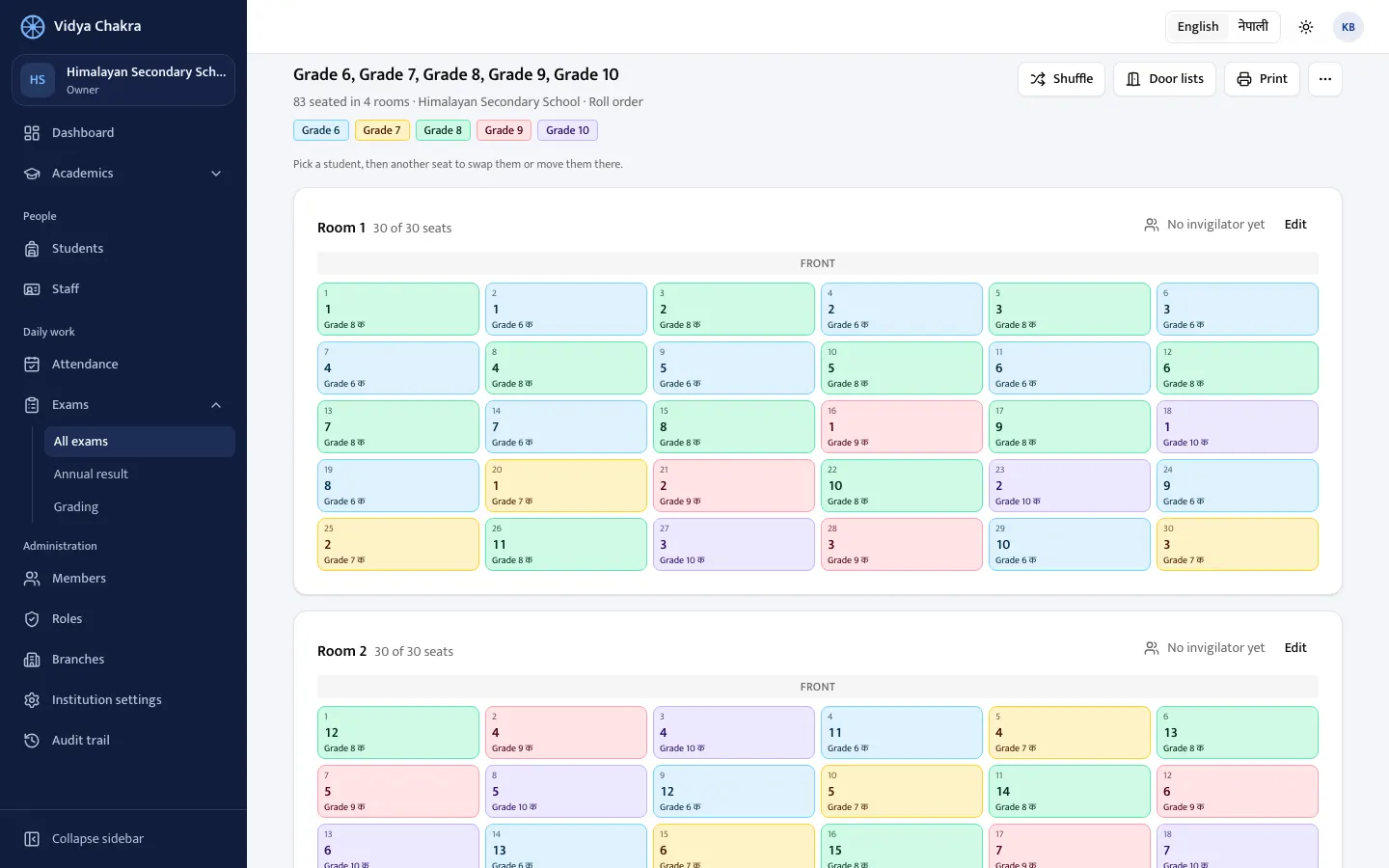
Seating plans that keep classmates apart
Pick the classes and the rooms: no two students of a class sit side by side or one behind the other. Shuffle, swap two students with a click, and print the lists for each door.
- Admit cards with each student's room, seat and routine
- Invigilators for every room
- Two shifts in the same rooms
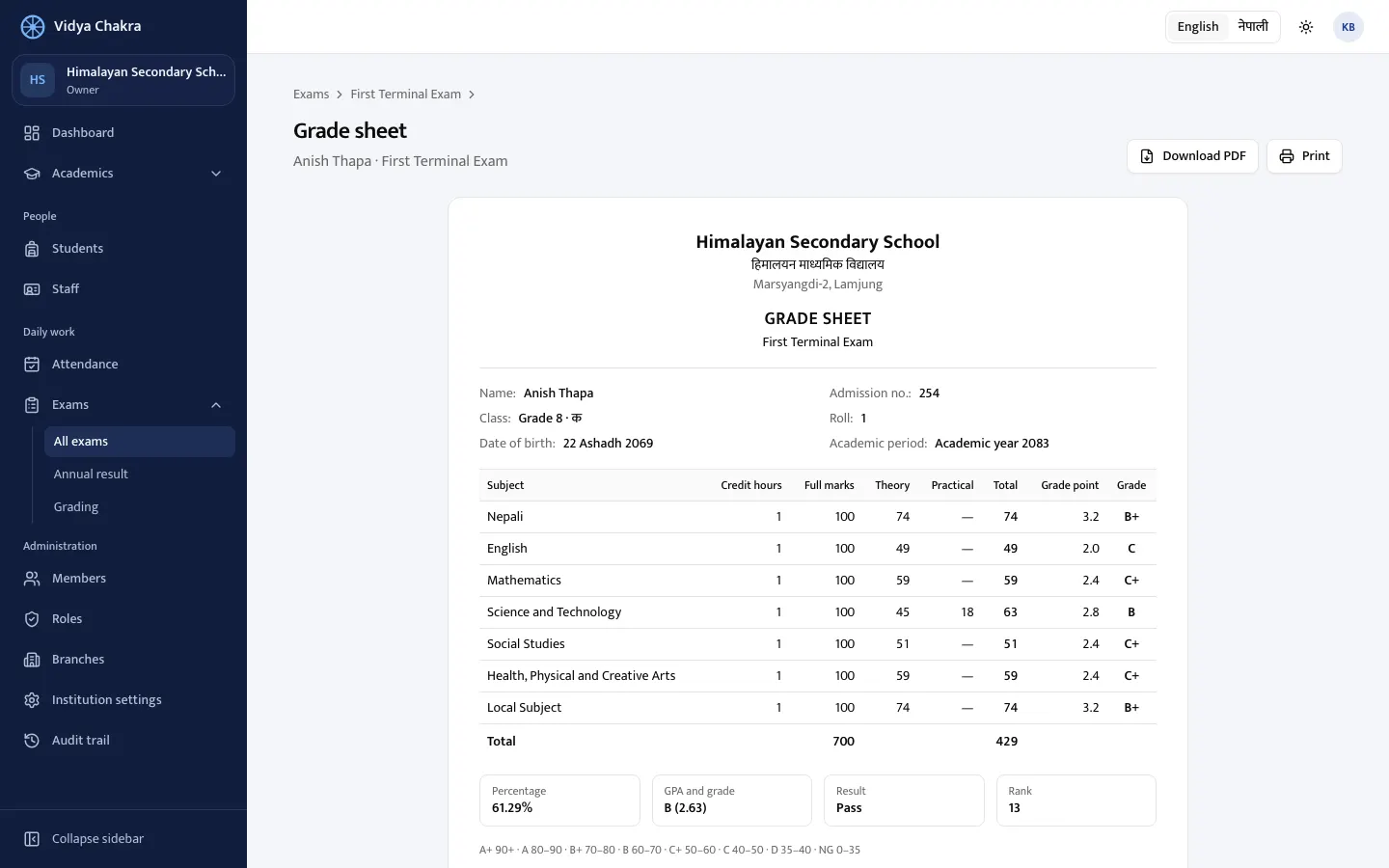
Grade sheets parents can read
Every subject's marks and grade, GPA or division, rank and the grading key, on one A4 page in Nepali or English, with your logo. A whole class prints as one PDF.
- Annual grade sheets from the weighted exams
- Student ID cards with photo and QR code, nine to a sheet
- Nepali digits and BS dates if you prefer
And the everyday work
Fees, receipts and dues
Monthly bills from your fee structure, receipts for cash, bank, eSewa, Khalti or Fonepay, discounts and scholarships, and who still owes.
Students and guardians
Admission with brothers and sisters sharing guardians, enrollment by class, photos kept private.
Attendance in a minute
Present, absent, late or on leave for the whole class from a phone, even without internet, with monthly registers.
Staff records
Teachers and every other staff member, private details encrypted, and staff ID cards.
The right access for each person
Principal, teacher, accountant, exam coordinator: roles you can adjust, branch by branch.
Every change recorded
Who changed a mark, a record or a role, and when.
Works on any phone
Nothing to install: open it in the browser, or add it to the home screen like an app.
For every kind of institution
Your own classes, terms and grading, set up from ready-made presets.
Community schools
ECD to class 12, Nepali first, with darbandi and rahat staff.
Private schools
Nursery to class 10 with the CDC curriculum, English first.
+2 colleges
Science, management, humanities, education and law streams, with NEB subjects and optional groups.
Colleges and campuses
Bachelor's and master's by semester or by year, with percentage and division.
Institutes and training centres
CTEVT diplomas and short courses run in batches.
Your institution's data stays yours
- Kept apart from every other institution
- Children's photos shown only to your staff, sensitive staff details encrypted
- Every change recorded in an audit trail
- The AI assistant reads only what each person may see, and changes nothing
On the way
We build with the institutions using it. Coming next:
- Online fee payment
- Accounting
- Payroll with SSF, CIT and TDS
- Guardian app and SMS
- Class routine
We're welcoming our first schools
Book a free demo
Join early, tell us what your institution needs, and help shape Vidya Chakra. Ask us about pricing during the demo.
What happens next
- 1We call you to learn about your institution.
- 2We show it working in a demo school, with your questions answered.
- 3You decide, with no obligation.
Questions schools ask
Do we need to install anything?
No. It works in the browser on phones, tablets and computers, and can be added to the home screen like an app.
Can we use it only in Nepali?
Yes. Every screen and printout works in Nepali or English, and each person chooses their own. Nepali digits too, if you prefer.
Our student lists are in Excel, some typed in Preeti.
Bring them in. Columns are recognised in English or Nepali, Preeti is converted to Unicode, and every row is checked before anything is saved.
Does it follow NEB grading?
Yes: NEB letter grading and GPA, TU-style percentage and division, or pass and fail. You can adjust the bands.
Is our data safe?
Each institution's data is kept apart, every person sees only what their role allows, sensitive staff details are encrypted, and every change is recorded.
Is the AI safe to use with children's records?
Ask the School is off until your institution turns it on. It only reads, never changes anything, and sees only what the person asking may see, so a teacher sees their own classes. The question and the records that answer it go to the AI provider (Google Gemini or Anthropic Claude); for schools using it with real students we run it on a paid plan, under which the provider does not use them to train its models.
What about fees and accounting?
Fees are in: monthly bills, receipts by cash, bank, eSewa, Khalti or Fonepay, refunds and dues. Accounting is next; tell us how your institution keeps its books and we'll build it with you.
How much does it cost?
We'll talk about pricing during the demo.